Your marker has read hundreds of assignments. Before they get to your argument, they’ve already noticed whether your document looks put together or not. That first impression is solid and it sticks if fonts, spacing, and alignment are on point. Most students spend the night before fixing their points and never touch any of this.
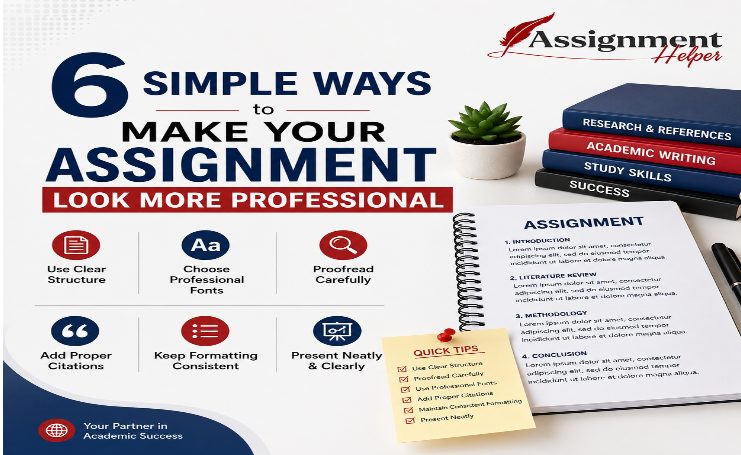
The thing is, presentation isn’t about making your work look pretty. It’s about making it easy to read and take seriously. These six things take almost no time, and they make a more visible difference than most students expect.
Practical Tips To Make Your Assignments More Professional
Tip 1 – One Font. One Size. No Exceptions.
Most students don’t even notice when their font changes, but their marker does. It happens when you copy-paste from a PDF, a slide deck, or a website. The text comes in carrying its own formatting, and suddenly your document has three different fonts running through it without you touching a thing.
The fix is simple: paste everything as plain text first, then format it yourself. Times New Roman 12pt or Arial 11pt both work well for most university submissions. Set your line spacing to 1.5 at minimum, double if your brief allows it. Do this once at the start and you won’t have to think about it again. A consistent font makes the whole document feel intentional, even before anyone reads a word.
Tip 2 – Headings Should Guide, Not Decorate
There are two types of students when it comes to headings, ones who skip them entirely and those who slap a heading on every single paragraph. Both make the document harder to read than it needs to be.
A heading has one job: tell the reader what’s coming. That’s it. A useful heading helps your marker find where one idea ends and another begins. A useless one just repeats what the paragraph already says.
Before you keep a heading, ask yourself one thing: if it wasn’t there, would the reader feel lost? If yes, keep it. If no, cut it.
A few things worth keeping consistent:
- Don’t skip levels, H1 to H3 with no H2 in between looks messy
- Keep heading text short, four to six words is usually enough
- Match the tone of your headings across the whole document
Tip 3 – Margins and Alignment: Check It Once, Fix It for Good
Most students open a new document and just start typing. Default margins, default alignment, no adjustments. It doesn’t seem like a big deal until you look at the printed page and something feels off, because it is.
Check your assignment brief first. Most submissions require 1-inch margins on all sides. If yours are sitting at 1.27 or 1.5 from an old template, fix it now. For alignment, keep your body text left-aligned, not justified. Justified text stretches words unevenly across the line and actually makes longer paragraphs harder to read.
This is one of those things that come up a lot when students look for assignment help in SG. The content is solid, but the page looks unpolished because margins and alignment were never touched. Two settings, two minutes, and the whole document looks cleaner.
Tip 4 – Your Reference List Speaks for You
Citations are almost always done last, and it shows. Wrong format, missing details, inconsistent spacing, a rushed reference list stands out even to a marker who’s skimming.
Pick one citation style, APA, Harvard, or Chicago, and stick to it from the first source to the last. Don’t mix formats halfway through because you switched between different guides.
A few basics that are easy to get right:
- Use a citation generator to save time, but always check the output manually
- Format your reference list with a hanging indent
- Keep entries in alphabetical order
- Match the font size to the rest of your document
A clean reference list doesn’t take long to put together. A messy one tells the marker the whole assignment was rushed, even if the body was solid.
Tip 5 – A Cover Page and Page Numbers Actually Matter
These two things take five minutes combined, yet a surprising number of students either skip them or set them up wrong. Your cover page doesn’t need to look fancy, it just needs the right information. Assignment title, your name or student ID, module name, and submission date. That’s it. Nothing decorative, nothing extra.
If you’ve ever gotten to this stage and just wanted to type “write my assignment” into Google and hand the whole thing off, this is usually what’s making it feel messier than it actually is. Two small additions and the document immediately feels complete.
For page numbers, pick either the header or the footer, not both. Check your brief for whether the numbering starts from page one or page two. On longer submissions, markers genuinely appreciate this. It makes navigation easy and signals that the document was put together with some thought.
Tip 6 – One Last Check Before You Submit
Most students proofread line by line and miss things that are obvious the moment you zoom out. Before you hit submit, set your document view to 75% and scroll through the whole thing without reading a single word, just look at it as a page.
What to look for
Headings are stranded at the bottom with no content below them, uneven spacing between sections, and orphaned lines sitting alone at the top of a new page. These are things you simply cannot catch when you’re reading closely. You need the distance.
Why it’s worth doing
Formatting doesn’t rescue weak content, but it makes strong content land the way it deserves to. Two minutes before submission, and your document goes from looking rushed to looking ready.
FAQs
How do I make my assignment look more professional?
Start with the basics: one consistent font, proper margins, clear headings, and a clean reference list. These small formatting fixes take almost no time but make a visible difference in how your work is received.
Where can I find assignment help in SG?
There are several platforms offering assignment help in SG, but before outsourcing, check your formatting first. Most presentation issues are fixable in under 30 minutes with the right adjustments.
What should I do if I can’t write my assignment on time?
If you’re struggling to write my assignment before a deadline, start with structure, a clear outline, proper headings, and formatted sections. Breaking it down visually makes the writing process significantly easier to manage.
Final Thought
None of these are big changes. They’re small habits that most students skip because they don’t seem important enough to bother with until the grade comes back. Get them right once, set them as your default, and every submission after this one starts from a better place. Presentation is a skill like any other. You’re not born knowing it. You just have to do it enough times that it stops being something you think about.



Beşiktaş Kameralı Su Kaçağı Tespiti Duvar içi su kaçağı cihazla bulundu. https://pleasurebydidier.com