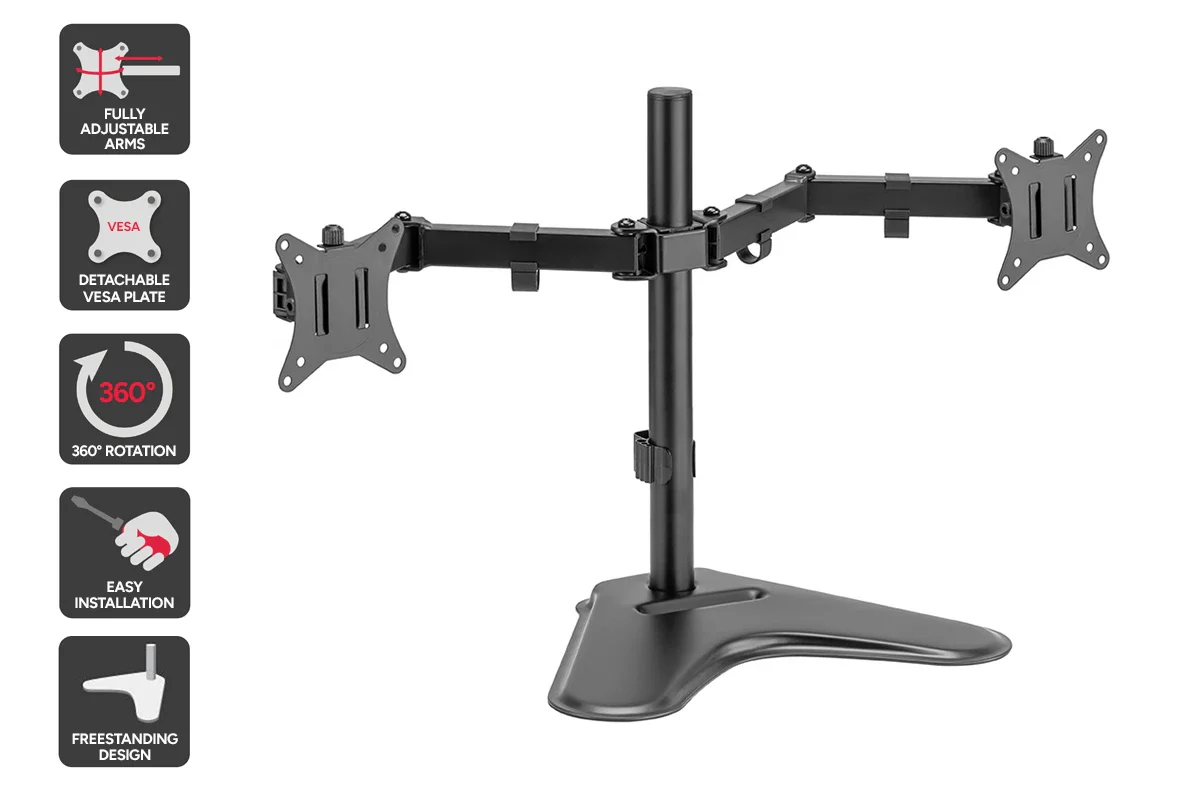
Your desk should help you work comfortably, not leave you feeling tired or sore at the end of the day. When your screen sits too low or takes up too much desk space, your body slowly feels the strain. You may bend your neck without noticing. Your shoulders may tighten after a few hours. Even a well-sized desk can feel messy and cramped. A clamp monitor arm helps solve these common problems by raising your screen to a better height, clearing desk space, and giving you control over how your screen sits. This simple upgrade can make long workdays feel more comfortable, organised, and less stressful.
Why Your Monitor Position Affects How You Feel
Screen position plays a bigger role in daily comfort than many people realise. When your monitor sits too low, your head naturally tilts forward. When it is too far away, your eyes work harder to focus. Over time, these small issues add up. You may feel tired earlier in the day or find yourself shifting in your chair often without fixing the real issue. Raising your screen closer to eye level supports a relaxed posture and helps reduce strain on your neck, shoulders, and eyes.
How Desk-Mounted Screen Supports Improve Your Setup
A desk-mounted screen support attaches to the edge of your desk rather than sitting on it. This lifts the screen above the desk surface and creates a cleaner, more open workspace. You gain more room for your keyboard, mouse, notebooks, and other daily items. Your desk feels less crowded, which helps you stay focused and organised throughout the day.
A Cleaner Desk Helps You Work Better
A cluttered desk can make even simple tasks feel harder. When screens take up valuable surface space, everything else feels squeezed in. By lifting the screen off the desk, you instantly create more room. Even smaller desks feel larger and easier to use. This extra space makes it easier to spread out documents, keep essentials nearby, and maintain a tidy work area. A cleaner desk often leads to better focus and a calmer mindset.
Comfort During Long Work or Study Hours
If you spend many hours at your desk, comfort becomes essential. Adjustable screen arms let you move your display up, down, forward, or back with very little effort. You can raise the screen when sitting upright or tilt it slightly when leaning back. These small adjustments help reduce neck and shoulder tension during long sessions and make daily tasks feel easier on your body.
Easy Installation Without Desk Damage
Many people worry about damaging their desk when adding accessories. clamp monitor arm are designed to hold firmly without drilling or permanent changes. They attach securely to the desk edge using pressure and stay stable when fitted correctly. This makes them suitable for home offices, shared workspaces, and rental setups where desk damage is not an option.
Screen Adjustments That Match Your Daily Tasks
Your work changes throughout the day. You may read documents, type emails, attend meetings, or watch videos. A flexible screen arm lets you adjust the display to suit each task. You can pull the screen closer for reading, push it back for typing, or tilt it to reduce glare from lights or windows. These adjustments help reduce eye strain and improve focus during different activities.
Who Benefits From Better Screen Placement
Improved screen height and movement can benefit many types of users, including:
- Office workers handling emails and reports
- Students attending online classes
- Designers switching between creative tools
- Programmers reading long lines of code
- Remote workers using multiple apps daily
If you sit at a desk for most of the day, proper screen placement plays a bigger role in comfort than you may expect.
When a Triple Monitor Arm Is a Better Choice
If you use three screens, separate stands can feel uneven and take up too much space. A triple monitor arm keeps all displays aligned at the same height and distance. This helps your eyes move smoothly between screens and reduces unnecessary head movement. It also keeps your desk looking neat and professional, especially in workspaces where multitasking is common.
Choosing the Right Mount for Your Desk
Before selecting a screen mount, it is important to check your desk thickness and monitor size. These details help avoid fitting problems later. A well-matched mount holds your screen securely and reduces pressure on both the desk and the display. Taking a few minutes to check compatibility can save time and effort in the long run.
Better Posture Supports Better Focus
When your screen sits at a natural viewing height, your posture improves without effort. You stop leaning forward and adjust your position less often. This helps you stay focused for longer periods and feel less tired by the end of the day. Small posture changes can make a noticeable difference in daily comfort.
Final Thoughts on Improving Your Desk Setup
If your desk feels crowded or uncomfortable, it may be time to rethink how your screen is placed. A clamp monitor arm helps lift your display, free up desk space, and support better posture during long work hours. Many people turn to Tech Trade Group for practical options that suit modern desks and everyday use. This small upgrade can make a noticeable difference in how your workspace feels each day.